<?xml version="1.0" encoding="utf-8"?><feed xmlns="http://www.w3.org/2005/Atom" ><generator uri="https://jekyllrb.com/" version="3.10.0">Jekyll</generator><link href="/feed.xml" rel="self" type="application/atom+xml" /><link href="/" rel="alternate" type="text/html" /><updated>2026-03-03T15:16:49+00:00</updated><id>/feed.xml</id><title type="html">The Parallel Interface</title><subtitle>Paralint.com helps you bring applications, cryptography and people together.</subtitle><entry><title type="html">Run an hardware accelerated Fuchsia emulator on WSL2</title><link href="/2022/11/find-new-modified-and-unversioned-subversion-files-on-windows" rel="alternate" type="text/html" title="Run an hardware accelerated Fuchsia emulator on WSL2" /><published>2022-11-05T00:00:00+00:00</published><updated>2022-11-05T00:00:00+00:00</updated><id>/2022/11/find-new-modified-and-unversioned-subversion-files-on-windows</id><content type="html" xml:base="/2022/11/find-new-modified-and-unversioned-subversion-files-on-windows"><![CDATA[<p><a href="https://fuchsia.dev/">Fuchsia</a> is an open source and security oriented operating system developped
at Google. You can run it in an emulator on your Mac or Linux computer. But what about Windows? With WSL2
running on the hypervisor, all that is required is to enable nested virtualization and fix an access mask.</p>

<h2 id="kvm-is-not-accelerated-by-default-on-wsl2">KVM is not accelerated by default on WSL2</h2>

<p>The <a href="https://fuchsia.dev/fuchsia-src/get-started/sdk">Getting started guide at fuchsia.dev</a> is great, but I’ll
use <a href="https://fuchsia.googlesource.com/sdk-samples/getting-started">the condensed version in the README file of the Fuchsia SDK</a> for this
if you want to follow along.</p>

<p>If you copy and paste the commands in your terminal, they will all work except that you will get this message 
when attempting to run the emulator:</p>

<div class="language-plaintext highlighter-rouge"><div class="highlight"><pre class="highlight"><code>$ tools/ffx emu start workstation_eng.qemu-x64 --headless
Logging to "/home/ixe013/.local/share/Fuchsia/ffx/emu/instances/fuchsia-emulator/emulator.log"
Waiting for Fuchsia to start (up to 60 seconds).............................................................
After 60 seconds, the emulator has not responded to network queries.
The emulator process is still running (pid 506).
The emulator is configured to use user-mode/port-mapped network access.
Hardware acceleration is disabled, which significantly slows down the emulator.
You can execute `ffx target list` to keep monitoring the device, or `ffx emu stop` to terminate it.
You can also change the timeout if you keep encountering this message by executing `ffx config set emu.start.timeout &lt;seconds&gt;`.
</code></pre></div></div>

<p>Even if the emulator process is running, you will be able to connect to it. Notice this message:</p>

<blockquote>
  <p>Hardware acceleration is disabled, which significantly slows down the emulator.</p>
</blockquote>

<p>You see this for two reasons:</p>
<ol>
  <li>Your account does not have permission on <code class="language-plaintext highlighter-rouge">/dev/kvm</code></li>
  <li>Hardware acceleration is not enabled</li>
</ol>

<p>The <a href="https://fuchsia.dev/fuchsia-src/get-started/set_up_femu#enable-vm-acceleration">Fuchsia instructions to enable VM acceleration on Linux</a>
don’t work in WSL2, we are going to fix that.</p>

<h2 id="enable-hardware-accelerated-emulation-in-wsl2">Enable hardware accelerated emulation in WSL2</h2>

<h3 id="grant-yourself-rights-to-the-kvm">Grant yourself rights to the KVM</h3>

<p>First of all, make your user a member of the <code class="language-plaintext highlighter-rouge">kvm</code> group with this command. It is the same command that you would do in Linux.</p>

<div class="language-plaintext highlighter-rouge"><div class="highlight"><pre class="highlight"><code>sudo usermod -a -G kvm ${USER}
</code></pre></div></div>

<p>Unfortunately - for a reason I don’t understand - <code class="language-plaintext highlighter-rouge">/dev/kvm</code> will always have <code class="language-plaintext highlighter-rouge">root:root</code> as its owner and primary group. 
To change that you must <code class="language-plaintext highlighter-rouge">chmod</code> at startup. Add the following section to the file <code class="language-plaintext highlighter-rouge">/etc/wsl.conf</code>:</p>

<div class="language-plaintext highlighter-rouge"><div class="highlight"><pre class="highlight"><code>[boot]
command = /bin/bash -c 'chown -v root:kvm /dev/kvm &amp;&amp; chmod 660 /dev/kvm'
</code></pre></div></div>

<h3 id="enable-nested-virtualization">Enable nested virtualization</h3>

<p>Nested virtualization is not enabled by default in WSL2, at least not in version 21H2 (OS build 22000.1165). You don’t need
to recompile your WSL distribution to enable nested virtualization, just add this section to your <code class="language-plaintext highlighter-rouge">/etc/wsl.conf</code>:</p>

<div class="language-plaintext highlighter-rouge"><div class="highlight"><pre class="highlight"><code>[wsl2]
nestedVirtualization=true
</code></pre></div></div>

<h3 id="restart-wsl2">Restart WSL2</h3>

<p>You need to restart WSL2 for the changes to take effect. You can also restart your computer, but it is faster to close every terminal 
window and run the following command (using the Windows Key + R, or in an existing Powershell or CMD prompt):</p>

<div class="language-plaintext highlighter-rouge"><div class="highlight"><pre class="highlight"><code>wsl.exe --shutdown
</code></pre></div></div>

<h2 id="trying-it-out">Trying it out</h2>

<p>From that point on, you are done! Open a new terminal window to start WSL2 under its new configuration and just follow the Fuchsia emulator
startup instructions as if your were using Linux on bare metal.</p>

<div class="language-plaintext highlighter-rouge"><div class="highlight"><pre class="highlight"><code>$ tools/ffx emu start workstation_eng.qemu-x64 --headless
Logging to "/home/ixe013/.local/share/Fuchsia/ffx/emu/instances/fuchsia-emulator/emulator.log"
Waiting for Fuchsia to start (up to 60 seconds)...................................
Emulator is ready.
</code></pre></div></div>

<p>Enjoy!</p>]]></content><author><name>ixe013</name></author><category term="blog" /><category term="Other technical" /><category term="Fuchsia" /><summary type="html"><![CDATA[Fuchsia is an open source and security oriented operating system developped at Google. You can run it in an emulator on your Mac or Linux computer. But what about Windows? With WSL2 running on the hypervisor, all that is required is to enable nested virtualization and fix an access mask.]]></summary></entry><entry><title type="html">Find new, modified and unversioned Subversion files on Windows</title><link href="/2011/12/find-new-modified-and-unversioned-subversion-files-on-windows" rel="alternate" type="text/html" title="Find new, modified and unversioned Subversion files on Windows" /><published>2011-12-09T04:52:01+00:00</published><updated>2011-12-09T04:52:01+00:00</updated><id>/2011/12/find-new-modified-and-unversioned-subversion-files-on-windows</id><content type="html" xml:base="/2011/12/find-new-modified-and-unversioned-subversion-files-on-windows"><![CDATA[<p>Nobody likes to break the build. When I do it, it is often because I forgot to add a file to the repository. The build server will not get it and the build will break.</p>

<p>This Windows batch file will parse Subversion’s <code class="language-plaintext highlighter-rouge">svn up</code> output and show you what files were modified, but also what files should be added.</p>

<p>It looks for C++, C, H, PHP, Python, Java and then some. You can easily add your own to the list.</p>

<p>To use simply call localfiles.bat from any versionned directory. Anything you add to the command line will be passed along to <code class="language-plaintext highlighter-rouge">svn up</code>. Try these variations :</p>

<ul>
  <li>
    <p><code class="language-plaintext highlighter-rouge">localfiles.bat -u</code><code class="language-plaintext highlighter-rouge"> to see potential update conflicts.</code></p>
  </li>
  <li>
    <p><code class="language-plaintext highlighter-rouge">localfiles.bat c:\the\path\to\my\project\sources</code><code class="language-plaintext highlighter-rouge"> works, you can run the command from anywhere</code></p>
  </li>
  <li>
    <p><code class="language-plaintext highlighter-rouge">localfiles.bat --ignore-externals</code><code class="language-plaintext highlighter-rouge"> or any other Subversion command you can think of</code></p>
  </li>
</ul>

<p>In the sample output (below) you will see</p>

<ul>
  <li>
    <p>New Source Files are source that were added (localy) but never comitted.</p>
  </li>
  <li>
    <p>Modified Source Files are source that are under source control and were modified locally.</p>
  </li>
  <li>
    <p>Unversioned Source Files are source that probably should be under source control.</p>
  </li>
  <li>
    <p>Each file is listed, with (no source file) if it looks ok.</p>
  </li>
</ul>

<div class="language-plaintext highlighter-rouge"><div class="highlight"><pre class="highlight"><code>$ localfiles.bat C:\Users\Guillaume\src\Projects\aucun.selfserve

Gathering data...

======================================
 New sourcefiles
======================================
(none found)

======================================
 Modified sourcefiles
======================================
M       C:\Users\Guillaume\src\Projects\aucun.selfserve\GINA\SecurityHelper.cpp
M       C:\Users\Guillaume\src\Projects\aucun.selfserve\GINA\loggedout_dlg.cpp
M       C:\Users\Guillaume\src\Projects\aucun.selfserve\common\Trace.c
M       C:\Users\Guillaume\src\Projects\aucun.selfserve\GINA\GinaHook.c

======================================
 Unversioned files
======================================
?       C:\Users\Guillaume\src\Projects\aucun.selfserve\GINA\StaticPrompt.cpp
?       C:\Users\Guillaume\src\Projects\aucun.selfserve\shellie\shellie_p.c
?       C:\Users\Guillaume\src\Projects\aucun.selfserve\shellie\dlldata.c
?       C:\Users\Guillaume\src\Projects\aucun.selfserve\shellie\shellie_i.c
?       C:\Users\Guillaume\src\Projects\aucun.selfserve\shellie\shellie.h
</code></pre></div></div>

<p><a href="/blog/wp-content/uploads/2011/12/localfiles.txt">Here is the file</a>. I gave it a txt extension, in case you are behing a paranoïac corporate proxy.</p>]]></content><author><name>ixe013</name></author><category term="blog" /><category term="Other technical" /><category term="Windows" /><summary type="html"><![CDATA[Nobody likes to break the build. When I do it, it is often because I forgot to add a file to the repository. The build server will not get it and the build will break.]]></summary></entry><entry><title type="html">Bug dans le changement de mot de passe SMTP de Videotron</title><link href="/2011/09/bug-dans-le-changement-de-mot-de-passe-smtp-de-videotron" rel="alternate" type="text/html" title="Bug dans le changement de mot de passe SMTP de Videotron" /><published>2011-09-27T03:55:20+00:00</published><updated>2011-09-27T03:55:20+00:00</updated><id>/2011/09/bug-dans-le-changement-de-mot-de-passe-smtp-de-videotron</id><content type="html" xml:base="/2011/09/bug-dans-le-changement-de-mot-de-passe-smtp-de-videotron"><![CDATA[<p>Le site de support à la clientèle de Vidétron offre la possibilité de changer le mot de passe STMP ou POP associé à votre compte. Ce mot de passe n’est pas le même que celui utilisé pour ouvrir une session dans l’espace client. Votre code d’utilisateur débute par VL (en minuscule, pour Videotron lté) vlxxxxxx et vous avez un mot de passe associé pour la réception de courriel SMTP.</p>

<p>J’ai eu à changer ce mot de passe et j’ai bloqué longtemps sur le problème suivant. Et non, je n’ai pas essayé de contacter le support technique à ce sujet, des plans pour qu’ils me demandent de formatter mon PC.</p>

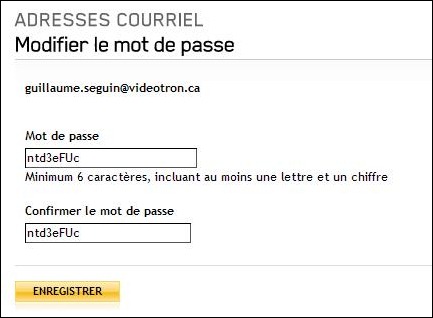
<p>En fait, c’est tout simple. Lorsque vous entrez votre mot de passe dans ce formulaire les majuscules sont converties en minuscules, tout simplement.:</p>

<p><img src="/blog/images/2011-09-27-bug-dans-le-changement-de-mot-de-passe-smtp-de-videotron/ntd3eFUc.jpg" alt="ntd3eFUc" /></p>

<p>Je me suis douté de quelque chose quand les mots de passe générés par Password Safe ne fonctionnais pas, mais les blasphèmes et insultes marchait tout le temps… Pas de majuscules !</p>

<p>Alors allez vous choisir un nouveau mot de passe SMTP, tout en minuscules. Nous savons tous qu’il n’a pas changé depuis 5 ans au moins !</p>]]></content><author><name>ixe013</name></author><category term="blog" /><category term="En français" /><category term="Other technical" /><summary type="html"><![CDATA[Le site de support à la clientèle de Vidétron offre la possibilité de changer le mot de passe STMP ou POP associé à votre compte. Ce mot de passe n’est pas le même que celui utilisé pour ouvrir une session dans l’espace client. Votre code d’utilisateur débute par VL (en minuscule, pour Videotron lté) vlxxxxxx et vous avez un mot de passe associé pour la réception de courriel SMTP.]]></summary></entry><entry><title type="html">Activate XP Mode with the latest Virtual Box on Windows 7</title><link href="/2011/08/activate-xp-mode-with-the-latest-virtual-box-on-windows-7" rel="alternate" type="text/html" title="Activate XP Mode with the latest Virtual Box on Windows 7" /><published>2011-08-30T04:14:22+00:00</published><updated>2011-08-30T04:14:22+00:00</updated><id>/2011/08/activate-xp-mode-with-the-latest-virtual-box-on-windows-7</id><content type="html" xml:base="/2011/08/activate-xp-mode-with-the-latest-virtual-box-on-windows-7"><![CDATA[<p>Windows XP mode is like a virtual image that allows you to run Windows XP (applications) on Windows 7. It comes with an activation key, in the file key.txt in XP Mode installation folder (C:\Program Files\Windows XP Mode\KEY.txt). It will activate your Windows XP virtual image in Virtual PC or in VMWare player, but it will not work with Virtual Box.</p>

<p>The activation feature itself is not totally broken, it is just that the key supplied is not recognized as a valid one. I don’t know what makes up a valid activation key, but there an easy workaround that might work for you.</p>

<p>Use the activation key of an old computer.</p>

<p>That’s it. No need for any Virtual Box plug-ins and what not. Any activation key that is on any computer that still have their Windows XP sticker, but don’t need it anymore. Maybe you installed Linux on that old desktop that was getting a little slow ? I used the license that came with had a Dell D430 on which I installed my Partner license for demonstration purposes.</p>

<p>From my experience, it looks like Windows XP is less fussy about Windows SKU numbers than Windows 7 is. YMMV.</p>]]></content><author><name>ixe013</name></author><category term="blog" /><summary type="html"><![CDATA[Windows XP mode is like a virtual image that allows you to run Windows XP (applications) on Windows 7. It comes with an activation key, in the file key.txt in XP Mode installation folder (C:\Program Files\Windows XP Mode\KEY.txt). It will activate your Windows XP virtual image in Virtual PC or in VMWare player, but it will not work with Virtual Box.]]></summary></entry><entry><title type="html">Edit a remote registry through Windbg</title><link href="/2011/03/edit-a-remote-registry-through-windbg" rel="alternate" type="text/html" title="Edit a remote registry through Windbg" /><published>2011-03-30T03:02:02+00:00</published><updated>2011-03-30T03:02:02+00:00</updated><id>/2011/03/edit-a-remote-registry-through-windbg</id><content type="html" xml:base="/2011/03/edit-a-remote-registry-through-windbg"><![CDATA[<p>I found a way to edit the registry while under a remote Windbg session. !dreg allows you to read the registry, but I had added a corrupt authentication package to the Lsa list in the registry that I had to remove. I found out the hard way that LSASS will load all authentication packages listed, even if you boot in safe mode.</p>

<p>Fortunately, I had <a href="http://blogs.msdn.com/b/alejacma/archive/2007/11/13/how-to-debug-lsass-exe-process.aspx">set up LSASS to run under ntsd</a>, which was connected to a remote Windbg.</p>

<p>To edit the registry of a remote machine running under a debugger :</p>

<ol>
  <li>
    <p>Break into the debugger. This step will happen naturally in most snafu <img src="/blog/images/2011-03-30-edit-a-remote-registry-through-windbg/wlEmoticon-winkingsmile.png" alt="Winking smile" /></p>
  </li>
  <li>
    <p>Start a shell with the .! command</p>
  </li>
  <li>
    <p>Fix the registry with the command line reg.exe tool. For example, to restore authentication packages type</p>
  </li>
</ol>

<div class="language-plaintext highlighter-rouge"><div class="highlight"><pre class="highlight"><code>reg add HKLM\SYSTEM\CurrentControlSet\Control\Lsa /v "Authentication packages" /t REG_MULTI_SZ /d msv1_0
</code></pre></div></div>

<ol>
  <li>Type exit to quit the shell (hit Enter enough times to get back to Windbg’s prompt)</li>
</ol>

<p>Then use the g command to resume execution.</p>

<p>As a side note : The windows subsystem is fully loaded before LSASS.exe starts, or at least there is enough of it to launch CMD.exe and REG.exe.</p>]]></content><author><name>ixe013</name></author><category term="blog" /><category term="Other technical" /><category term="Windows" /><summary type="html"><![CDATA[I found a way to edit the registry while under a remote Windbg session. !dreg allows you to read the registry, but I had added a corrupt authentication package to the Lsa list in the registry that I had to remove. I found out the hard way that LSASS will load all authentication packages listed, even if you boot in safe mode.]]></summary></entry><entry><title type="html">How to debug a Credential Provider locally</title><link href="/2011/03/how-to-debug-a-credential-provider-locally" rel="alternate" type="text/html" title="How to debug a Credential Provider locally" /><published>2011-03-26T05:11:12+00:00</published><updated>2011-03-26T05:11:12+00:00</updated><id>/2011/03/how-to-debug-a-credential-provider-locally</id><content type="html" xml:base="/2011/03/how-to-debug-a-credential-provider-locally"><![CDATA[<p>Here is a quick and easy way to debug a Credential Provider running on your development machine, without needing to set up a kernel debugging session with two computers. Before you go down this road, let me tell you a little bit about LogonUI.exe behavior (as seen on Windows 7 ultimate SP1 64 bits) set to require CTRL-ALT-DEL to log on.</p>

<ul>
  <li>
    <p>Every time you type CTRL-ATL-DEL, a new LogonUI process is launched.</p>
  </li>
  <li>
    <p>LogonUI will try to load any registered Credential Providers COM objects.</p>
  </li>
  <li>
    <p>You can <a href="/blog/2011/03/15/can-your-gina-do-this/">run any process on the secure desktop</a></p>
  </li>
</ul>

<p>With that knowledge, it is easy to set up a debugging session for your Credential Provider, right on your development machine. Before I continue, be aware that it might affect the stability of your computer temporarily, as the following illustration shows.</p>

<p><img src="/blog/images/2011-03-26-how-to-debug-a-credential-provider-locally/6015610.jpg" alt="6015610" /></p>

<!-- more -->

<p>To debug your credential provider, you will need this :</p>

<ul>
  <li>
    <p>A CredentialProvider that can be loaded by LogonUI</p>
  </li>
  <li>
    <p>Microsoft’s <a href="http://msdn.microsoft.com/en-us/windows/hardware/gg463009.aspx">Debugging Tools for Windows</a></p>
  </li>
  <li>
    <p>Microsoft’s <a href="http://technet.microsoft.com/en-us/sysinternals/bb897553">psexec</a> tool (of Sysinternals fame)</p>
  </li>
</ul>

<p>I guess you could also use Visual Studio instead, ymmv. If it works, please drop us a line in the comments.</p>

<p>To start debugging, here is what you have to do:</p>

<ol>
  <li>Start a <a href="/blog/2011/03/15/can-your-gina-do-this/">command shell on the Secure Desktop</a> with this command:</li>
</ol>

<div class="language-plaintext highlighter-rouge"><div class="highlight"><pre class="highlight"><code>psexec -dsx cmd.exe
</code></pre></div></div>

<ol>
  <li>
    <p>Build a debug version of your Credential Provider and register it.</p>
  </li>
  <li>
    <p>Type CTRL-ALT-DEL to switch to the secure desktop. That will also launch LogonUI.exe</p>
  </li>
  <li>
    <p>Hit Alt-Tab to switch to the command prompt you started at step 1</p>
  </li>
  <li>
    <p>Change to the directory where your source code is</p>
  </li>
  <li>
    <p>Debug LogonUI.exe and set the source path at once, with this command :</p>
  </li>
</ol>

<div class="language-plaintext highlighter-rouge"><div class="highlight"><pre class="highlight"><code>windbg –pn logonui.exe –srcpath %CD%
</code></pre></div></div>

<p>That’s it. You might not be very familiar with windbg, so here are a few tips to get you started:</p>

<ul>
  <li>
    <p>When you attached to LogonUI at step 6, the process is stopped. You can enter commands to set breakpoints before resuming it.</p>
  </li>
  <li>
    <p>Verify that your Credential Provider is loaded with the lm command. Look for a string like this one:</p>
  </li>
</ul>

<div class="language-plaintext highlighter-rouge"><div class="highlight"><pre class="highlight"><code>000007fe`f5e80000 000007fe`f5e9b000 SampleCredentialProvider (private pdb symbols)
</code></pre></div></div>

<ul>
  <li>Just to be sure, verify that a specific symbol is loaded with this command (you should get an address):</li>
</ul>

<div class="language-plaintext highlighter-rouge"><div class="highlight"><pre class="highlight"><code>x SampleCredentialProvider!CSampleProvider::SetUsageScenario
</code></pre></div></div>

<ul>
  <li>Set a breakpoint to the same location with this command:</li>
</ul>

<div class="language-plaintext highlighter-rouge"><div class="highlight"><pre class="highlight"><code>bu SampleCredentialProvider!CSampleProvider::SetUsageScenario
</code></pre></div></div>

<ul>
  <li>Resume LogonUI with the g command.</li>
</ul>

<p>You can now lock your workstation and try to unlock it. When LogonUI appears to freeze, ATL-TAB to the debugger. It should be waiting for you with the source file loaded, waiting for your instructions. Type g to resume. Complete the unlock procedure to end LogonUI.</p>

<p>To reattach to logon UI, you can quit windbg and launch it again, but it is easier to list the process with the .tlist command (LogonUI.exe will be the last in the list). Attach to it again with .attach 0n2331 (replace with your PID).</p>

<p>Happy debugging !</p>

<p>Image credits : <a href="http://www.123rf.com/photo_6015610_idiot-saws-branch.html">http://www.123rf.com/photo_6015610_idiot-saws-branch.html</a></p>]]></content><author><name>ixe013</name></author><category term="blog" /><category term="Other technical" /><category term="Windows" /><summary type="html"><![CDATA[Here is a quick and easy way to debug a Credential Provider running on your development machine, without needing to set up a kernel debugging session with two computers. Before you go down this road, let me tell you a little bit about LogonUI.exe behavior (as seen on Windows 7 ultimate SP1 64 bits) set to require CTRL-ALT-DEL to log on.]]></summary></entry><entry><title type="html">Unlocking another user’s session using Credential Providers</title><link href="/2011/03/unlocking-another-users-session-using-credential-providers" rel="alternate" type="text/html" title="Unlocking another user’s session using Credential Providers" /><published>2011-03-24T13:08:08+00:00</published><updated>2011-03-24T13:08:08+00:00</updated><id>/2011/03/unlocking-another-users-session-using-credential-providers</id><content type="html" xml:base="/2011/03/unlocking-another-users-session-using-credential-providers"><![CDATA[<p>I have been working a little bit lately on a Credential Provider port of my custom GINA. I did some tests, I poked around the API and I whipped together something I could load and play with. The <a href="/blog/2009/02/24/porting-a-custom-gina-to-a-credential-provider/">route I first thought of taking is still the right one</a>, but I ran into some unexpected problems.</p>

<p>Microsoft new architecture is better, but the separation it enforces makes it hard to play tricks with the security policy. First, there are no shortcuts with Credential Providers. The <a href="http://archive.msdn.microsoft.com/Project/Download/FileDownload.aspx?ProjectName=ShellRevealed&amp;DownloadId=7341">documentation</a> is formal :</p>

<blockquote>CredentialProviders are not enforcement mechanisms. They are used to gather and serialize credentials. The Local Authority and Authentication Packages enforce security.</blockquote>

<p>So we have to use an authentication package with the credential provider. Nothing that we didn’t see coming. I have played with authentication packages before, it just a matter of writing one.</p>

<p>Second, LogonUI will not kill another user’s session. I am able to get a credential provider tile on the unlock screen, logon with administrator credentials, but then I get this error message :</p>

<blockquote>This computer is locked. Only the logged on user can unlock the computer.</blockquote>

<p>Which makes some sense: why kill (or unlock) a user’s session if you can just start a new session next to it ? Unfortunatly, it does not help the most common use case my custom GINA users need to solve: many users need to access a single application running in a single session.</p>

<p>But I haven’t given up yet.</p>

<p>I tested on Windows 7 Ultimate 64bits, with or without fast user switching. If you ever able to unlock another user’s session, write a line in the comments. I would love to hear about it.</p>]]></content><author><name>ixe013</name></author><category term="blog" /><category term="Authentication" /><category term="Other technical" /><category term="Windows" /><summary type="html"><![CDATA[I have been working a little bit lately on a Credential Provider port of my custom GINA. I did some tests, I poked around the API and I whipped together something I could load and play with. The route I first thought of taking is still the right one, but I ran into some unexpected problems.]]></summary></entry><entry><title type="html">Can your GINA do this ? (running any process on the secure desktop)</title><link href="/2011/03/can-your-gina-do-this" rel="alternate" type="text/html" title="Can your GINA do this ? (running any process on the secure desktop)" /><published>2011-03-16T03:06:17+00:00</published><updated>2011-03-16T03:06:17+00:00</updated><id>/2011/03/can-your-gina-do-this</id><content type="html" xml:base="/2011/03/can-your-gina-do-this"><![CDATA[<p>I get asked a lot of questions about my custom Gina. Most of them come from people who want to write a custom Gina themselves to do … whatever.</p>

<p>A custom Gina runs in Winlogon’s process. It runs under the SYSTEM account, in the TCB… In short it can do pretty much anything. But some things just can’t be done, no matter what rights you have.</p>

<p>Fortunately, there is an easy way to tell if a GINA can do what you need it to do, without having to write a single line of code.</p>

<!-- more -->

<p>The trick is to launch a cmd.exe shell (or whatever shell you prefer) on the Winlogon desktop. I used to work with <a href="http://www.ikriv.com/en/prog/tools/EnumWinstaGui/">EnumWinStaGui</a>, but <a href="http://technet.microsoft.com/en-us/sysinternals/bb897553">Microsoft’s own psexec (of Sysinternals fame)</a> is easier to use.</p>

<p>To run a cmd shell on Winlogon desktop, do the following :</p>

<ol>
  <li>
    <p>Logon with an account with administrator rights</p>
  </li>
  <li>
    <p>Open a command prompt (elevated if you are on Vista or later)</p>
  </li>
  <li>
    <p>Type this command :</p>
  </li>
</ol>

<div class="language-plaintext highlighter-rouge"><div class="highlight"><pre class="highlight"><code>psexec –dsx cmd.exe
</code></pre></div></div>

<p>That’s it ! You will not see your shell, because it is running on the current desktop. To verify that it works, hit CTRL-ALT-DEL and your command prompt will be there. On Vista and later, it will be hidden under the full screen logon application (logonui.exe). Just ALT-TAB to it. That shell will keep running even if you log out, because it is not tied to the interactive session you used to start it. From that command line on the secure desktop, launch whatever command you need to confirm that what you want to do can be done.</p>

<p>For example, say you need to launch a process that will notify a web application just before the password is validated, maybe to start a timekeeping application. Can it be done ? Yes. On the command line running on the secure desktop, type this command :</p>

<div class="language-plaintext highlighter-rouge"><div class="highlight"><pre class="highlight"><code>start iexplore http://www.paralint.com/
</code></pre></div></div>

<p>It might not work. Maybe your proxy is not set up in the SYSTEM account ? Whatever the problem may be, you need to fix it. Writing a custom Gina is a waste of time if you can’t get past this step.</p>]]></content><author><name>ixe013</name></author><category term="blog" /><category term="Other technical" /><category term="Security" /><category term="Windows" /><summary type="html"><![CDATA[I get asked a lot of questions about my custom Gina. Most of them come from people who want to write a custom Gina themselves to do … whatever.]]></summary></entry><entry><title type="html">Subversion GUI output from the command line</title><link href="/2011/02/subversion-gui-output-from-the-command-line" rel="alternate" type="text/html" title="Subversion GUI output from the command line" /><published>2011-02-16T04:22:09+00:00</published><updated>2011-02-16T04:22:09+00:00</updated><id>/2011/02/subversion-gui-output-from-the-command-line</id><content type="html" xml:base="/2011/02/subversion-gui-output-from-the-command-line"><![CDATA[<p>I use Subversion command line client. But I also have <a href="http://tortoisesvn.tigris.org/">Tortoise SVN</a> installed, because some operations like log and check-in benefit from the GUI.</p>

<p>Tortoise SVN is a Explorer shell extension which calls a Windows executable, TortoiseProc.exe.</p>

<p>To use it from the command line, simply save this batch file somewhere in your path :</p>

<div class="language-plaintext highlighter-rouge"><div class="highlight"><pre class="highlight"><code>@echo off 
start "" "C:\Program Files\TortoiseSVN\bin\TortoiseProc.exe" /command:%1 /path:"%2"
</code></pre></div></div>

<p>Then simply call like this :</p>

<div class="language-plaintext highlighter-rouge"><div class="highlight"><pre class="highlight"><code>tortoise log http://src.pararlint.com/aucun/trunk
</code></pre></div></div>

<p>or like this</p>

<div class="language-plaintext highlighter-rouge"><div class="highlight"><pre class="highlight"><code>tortoise commit .
</code></pre></div></div>

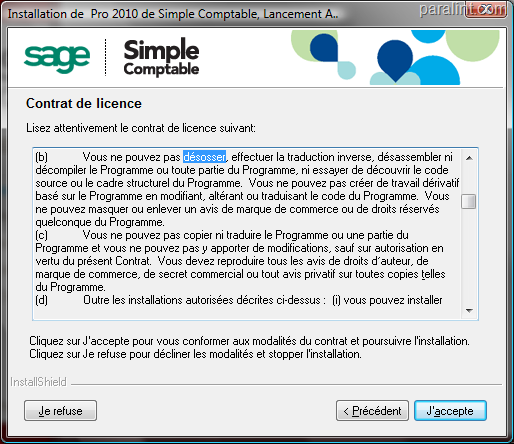
<p>Tested on Windows with 32 and 64 bits version.</p>]]></content><author><name>ixe013</name></author><category term="blog" /><category term="Other technical" /><category term="Windows" /><summary type="html"><![CDATA[I use Subversion command line client. But I also have Tortoise SVN installed, because some operations like log and check-in benefit from the GUI.]]></summary></entry><entry><title type="html">Interdit de désosser le logiciel Simple Comptable</title><link href="/2010/02/interdit-de-dsosser-le-logiciel-simple-comptable" rel="alternate" type="text/html" title="Interdit de désosser le logiciel Simple Comptable" /><published>2010-02-21T04:08:03+00:00</published><updated>2010-02-21T04:08:03+00:00</updated><id>/2010/02/interdit-de-dsosser-le-logiciel-simple-comptable</id><content type="html" xml:base="/2010/02/interdit-de-dsosser-le-logiciel-simple-comptable"><![CDATA[<p>Je lis toujours les contrats de licence. Celui de Simple Comptable 2010 est particulier : il nous interdit de <strong>désosser</strong> le logiciel !</p>

<p><img src="/blog/images/2010-02-21-interdit-de-dsosser-le-logiciel-simple-comptable/desosser.png" alt="Désosser Simple Comptable est interdit !" /></p>

<p>Après <a href="http://www.granddictionnaire.com/">vérification</a>, le terme “désosser” est bien celui qu’il faut utiliser pour désigner, en français, le <em>reverse engineering</em>. Malheureusement, je n’aurai peut-être pas l’occasion d’apprendre de nouveaux mots avec eux, puisque le contrat de license stipule aussi ceci :</p>

<blockquote>16.6    Québec :   En regard du Québec, les parties déclarent par les présentes qu'elles exigent que cette entente et tous les documents afférents, soit pour le présent ou l'avenir, soient rédigés en anglais seulement.</blockquote>

<p>Too bad !</p>]]></content><author><name>ixe013</name></author><category term="blog" /><category term="En français" /><summary type="html"><![CDATA[Je lis toujours les contrats de licence. Celui de Simple Comptable 2010 est particulier : il nous interdit de désosser le logiciel !]]></summary></entry></feed>